
Sputnik: Fast OSINT Search for Digital Artifacts
Overview
Sputnik is a lightweight browser extension designed to streamline the process of investigating digital artifacts such as IP addresses, domains, file hashes, and URLs. Built with open source intelligence (OSINT) resources, it enables users to quickly gather contextual data from publicly available sources. The tool is particularly useful for professionals in cybersecurity, digital forensics, threat intelligence, and online research who require rapid access to verified information without switching between multiple platforms.
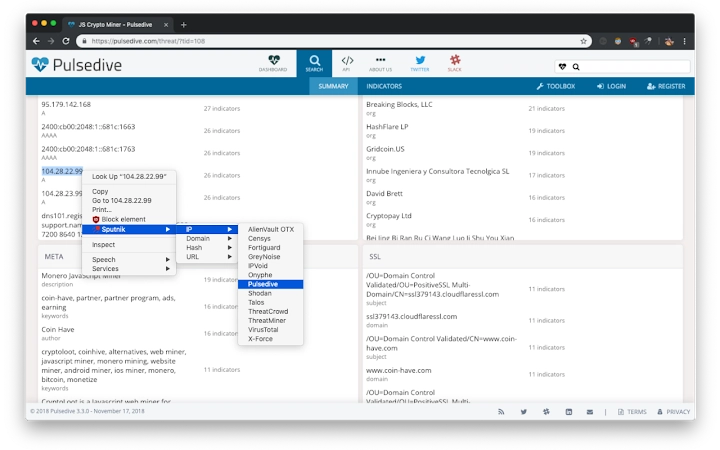
By integrating directly into the browser context menu, Sputnik allows users to select any text or link—be it an embedded image, audio file, video, or hyperlink—and initiate a search with a single right-click. This reduces workflow friction and enhances investigative speed. The extension supports multiple OSINT tools, each tailored to specific data types, ensuring accurate and relevant results.
Target users include cybersecurity analysts, researchers, journalists, and IT professionals who rely on real-time data validation and threat detection. While the developer did not provide additional details about the Sputnik Team’s background, the tool’s design reflects a focus on usability, security, and open-source transparency. Real-world usage scenarios include identifying malicious domains, verifying file integrity, tracing IP origins, and analyzing suspicious web content.
Key Features & Capabilities
- One-Click OSINT Search – Right-click any selected text or link to instantly search IPs, domains, file hashes, or URLs across integrated open-source platforms.
- Multi-Format Support – Works with text, hyperlinks, images, audio files, and videos, enabling comprehensive artifact investigation.
- Dynamic Tool Integration – Connects to a variety of OSINT tools, redirecting users directly to results or submission pages when interaction is required.
- Clipboard Auto-Save – For tools requiring user input (e.g., captchas), the selected artifact is automatically copied to the clipboard for easy pasting.
- Open Source Foundation – Built on free, publicly accessible intelligence resources, promoting transparency and trust in data sources.
These features enable efficient threat detection and digital investigation workflows. For example, a cybersecurity analyst can right-click a suspicious URL in an email and immediately view its reputation across multiple OSINT databases. Similarly, a researcher can analyze a file hash from a leaked document by selecting it and launching a check via integrated tools. The extension eliminates the need for manual copy-paste across platforms, reducing the risk of errors and saving time during high-pressure investigations.
User Interface, Workflow & Performance
The user interface of Sputnik is minimal and context-driven, relying entirely on the browser’s right-click menu for access. No additional panels, dashboards, or settings are visible within the browser window, ensuring a clean and distraction-free experience. Navigation is intuitive: users select an artifact, right-click, and choose an OSINT tool from the available list.
Workflow efficiency is a core strength. The extension operates in real time, initiating searches immediately after selection. In cases where user interaction is required—such as solving a captcha—the highlighted artifact is saved to the clipboard, and the user is redirected to the appropriate submission page. This seamless handoff maintains continuity in the investigative process.
The developer did not specify resource usage details. However, given the extension’s size of 1.5 MB and its reliance on external services, it is expected to have low CPU and RAM consumption during typical use. Performance observations are based on general software behavior patterns. Stability appears consistent with standard browser extensions, though exact long-term behavior was not disclosed.
Compatibility & System Requirements
Sputnik is compatible with Windows, Mac, and Linux operating systems, making it accessible across major desktop platforms. It is designed to function as a browser extension, meaning it requires a compatible web browser to operate. The extension has a file size of 1.5 MB, indicating a lightweight footprint that should not significantly impact system performance.
Exact system requirements were not listed. The developer did not provide information on minimum processor speed, RAM, or specific browser versions. Compatibility information is limited to the operating systems mentioned. Users should ensure their browser supports extensions and has JavaScript enabled to use Sputnik effectively.
Pros and Cons
Pros
- Fast, one-click access to OSINT tools via right-click context menu
- Supports multiple artifact types: IPs, domains, URLs, file hashes, images, audio, and video
- Automatically saves artifacts to clipboard when user interaction is required
- Lightweight at just 1.5 MB with no visible performance overhead
- Free to use with no licensing restrictions
- Open source foundation enhances transparency and trust
Cons
- Exact system requirements and browser compatibility details were not provided
- No built-in dashboard or history tracking for past searches
- Relies entirely on external OSINT tools, so results depend on third-party availability
- No offline functionality—requires internet connection for all operations
- Limited customization options for tool selection or workflow preferences
FAQ Section
Is Sputnik compatible with all web browsers?
Sputnik is designed to work with browsers that support extensions on Windows, Mac, and Linux. Specific browser compatibility was not listed by the developer.
Is Sputnik safe to use?
As a browser extension that uses free open source intelligence resources, Sputnik does not collect or transmit user data. It operates locally within the browser context, minimizing privacy risks. However, users should exercise caution when interacting with results from third-party OSINT tools.
How often does Sputnik receive updates?
The developer did not provide information on update frequency. Users are advised to check the official source for the latest version.
Can I use Sputnik without an internet connection?
No, Sputnik requires an active internet connection to access external OSINT tools and retrieve search results.
What license type does Sputnik use?
Sputnik is free to use and distributed under an open source model. The specific license type was not disclosed in the provided information.
Final Thoughts
Sputnik delivers a focused, efficient solution for professionals who need rapid access to OSINT data. Its minimal design, one-click functionality, and support for diverse digital artifacts make it a valuable addition to any investigative toolkit. While it lacks advanced features like search history or customization, its core purpose is executed with precision and speed.
For cybersecurity analysts, digital investigators, and researchers, Sputnik offers a reliable way to validate threats and verify content in real time. The absence of pricing and the open source nature of the tool further enhance its appeal. With a lightweight footprint and broad OS support, it integrates seamlessly into existing workflows.
Download Sputnik now







